Drops
Proactive Chat: Help Visitors Before They Ask

Casey Rowland

TL;DR
Proactive messages are short greetings your Weav chat widget shows when a visitor does something you chose on your site.
Five triggers: a specific page, a returning visitor, idle time, rage clicks, or a custom event from code on any page where the Weav widget is installed.
A visitor sees at most one proactive message per visit, and never while the chat is already open.
Each message gets 30-day reporting: Shown, Opened, Dismissed, Replied, Leads, and Resolved.
Launched October 22, 2026, and available on every plan.
We're excited to announce that proactive messages are now available for every Weav customer, regardless of what plan you're on. Each proactive message gets its own 30-day reporting, so you can see what's working, and what you need to tweak.
Plenty of visitors with a question never ask it. They hover on the pricing page, reread the same setup step, or rage click around then close the tab. We built proactive messages so your Weav Agent can meet them at that exact moment, with a useful question instead of a generic pop-up.
How does a proactive message work?
A proactive message is a greeting tied to a trigger. You decide when it appears, what it says, and what extra guidance your Weav Agent should follow once the visitor clicks.
Each message has a trigger, an opening message (up to 500 characters, with an optional 60-character mobile version), optional instructions for your Weav Agent, and display rules. By default, the agent asks a short, personalized follow-up question after the visitor clicks.
Which triggers can you use?
Trigger | When it fires |
|---|---|
Visitor is on a page | The URL matches your rules (contains, is exactly, starts with, or matches wildcard), optionally after 0 to 600 seconds on the page |
Returning visitor | The visitor has been here before, optionally after a minimum number of days |
Idle on page | No activity for 15 to 600 seconds (default 45) |
Frustration (rage clicks) | The visitor clicks the same spot 3 or more times within a second |
Custom event | Code on any page where the Weav widget is installed calls |
Which templates can you start from?
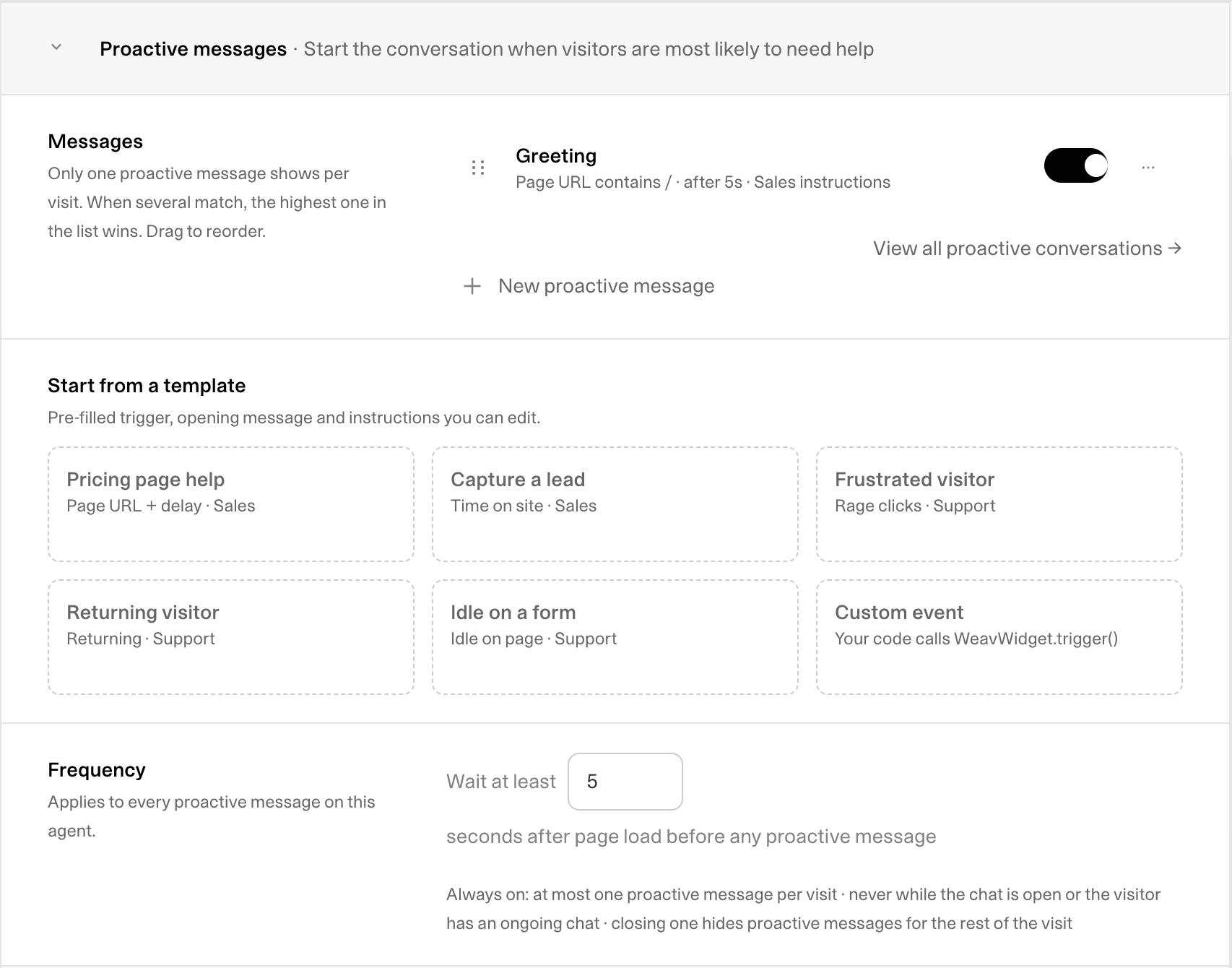
Six templates come pre-filled with a trigger, an opening message, and instructions. You can edit any of them before saving:
Pricing page help
Capture a lead
Frustrated visitor
Returning visitor
Idle on a form
Custom event
The pricing-page visitor
Use the Pricing page help template, set a URL rule like "contains /pricing," and open with "Comparing plans? I can help you pick the right one." Your instructions can tell your Weav Agent which questions to ask first, and your escalation rules decide when a teammate steps in. If you want the agent's sales instructions in play too, select Use this agent's sales instructions.
The docs or setup page
A new user is on your setup guide and stops moving. An Idle on page trigger, limited to your docs pages, can offer help with that exact step. Your Weav Agent keeps its usual instructions and training, plus any extra instructions you add to that message.
The trial that stalls
This is where the Custom event trigger earns its keep. Your product knows when a trial user hasn't finished setup. Fire an event like WeavWidget.trigger('setup_stalled') from your own code and show a message such as "Stuck on setup? I can walk you through the next step." You define the moment. Weav handles the conversation. It's the same principle we cover in customer onboarding: reach people before they get stuck.
The returning shopper
A shopper returns to a product page they viewed last week. A Returning visitor trigger limited to product pages can open with "Back for another look? Ask me about sizing or shipping."
How does Weav keep proactive messages from getting annoying?
Pop-ups that fire on every page train visitors to ignore them. So we built in guardrails:
A visitor sees one proactive message per visit, never more.
Nothing shows while the chat is open, or if the visitor opened it in the last 24 hours.
Once a visitor closes a message, the rest of that visit stays quiet.
If several messages match, the one highest in your list wins. Drag rows to set the order.
Restraint is the feature. You can also make every message wait 0 to 120 seconds after page load, and cap how often each one appears: once per visit, once every 24 hours, once every 7 days, or once ever.
How do you set up proactive messages?
Proactive messages run inside your embedded Weav chat widget, so install the widget first. The embed code is under Installation in Chat settings.
From there, open your agent's Chat settings, scroll to Proactive messages, and start from a template or select New proactive message. Pick a trigger, write the opening line, check the live preview, and switch it on. Each agent can run up to 20.
Every field, limit, and display option is in the proactive messages setup guide.

How do you measure each proactive message?
Every message has its own Reporting view for the last 30 days: Shown, Opened, Dismissed, Replied, Leads, and Resolved, plus open and reply rates. Select View conversations to jump into the conversations that message started.
In your inbox, conversations started by a proactive message show Started by: in the conversation details, and a Proactive message filter lets you see all of them or just one message. When a conversation needs a person, your escalation rules hand it to a teammate, with the whole conversation already in the thread.
Getting started
We think the best support question is the one you answer before the visitor gives up. Proactive messages launched on October 22, 2026, and are available on every plan. Start with one template and let the reporting tell you what to try next.
Weighing Weav against Intercom? Our Intercom alternative comparison covers how proactive messages and plans line up.
Want to see the rest of what your Weav Agent can do? Explore the product, or get started for free.
Frequently asked questions
What are proactive messages in Weav?
Proactive messages are Weav's version of proactive chat. You pick a trigger, such as a page visit, a return visit, idle time, rage clicks, or a custom event, and the chat widget opens with a short greeting you wrote. If the visitor clicks, your Weav Agent takes it from there.
How is proactive chat different from a chat pop-up?
A pop-up fires on a timer for everyone. A proactive message only appears when a visitor does something you chose, it shows at most once per visit, and it stays hidden while the chat is open or after the visitor closes it.
How often will a visitor see a proactive message?
At most once per visit. Weav also holds it back if the chat is already open, if the visitor opened the chat in the last 24 hours, or if they already closed a proactive message during that visit.
Can I trigger a proactive message from my own app?
Yes. Choose the Custom event trigger, enter an event name, and call WeavWidget.trigger('your_event_name') from code on any page where the Weav widget is installed. Event names use 1 to 64 letters, numbers, periods, underscores, colons, or hyphens.
Do proactive messages work in other languages?
Your opening message shows exactly as you write it, so you can write it in your customers' language. Once the visitor replies, the Weav Agent answers in their language, across 107 tested languages. The widget's own buttons and labels are in English. See the full list of supported languages.
When did proactive messages launch?
Proactive messages launched for all Weav customers, free or paid, on October 22, 2026.
Is proactive chat included in my plan?
Yes. Proactive messages are available on every Weav plan. Your Weav chat widget needs to be installed on your site first.
Related Articles
Casey Rowland